Context Lens 2 — the lens on real Station charts, up, down and sideways
Every chart below is drawn by the Station's own chart code, with the Station's own clouds, on real prices from the chart API. The lens is the small inset. This page is about one thing only: where the lens goes on a chart, and how it reads once it is there. No replay, no Geiger motion, no Visual Engine.
What you are looking at
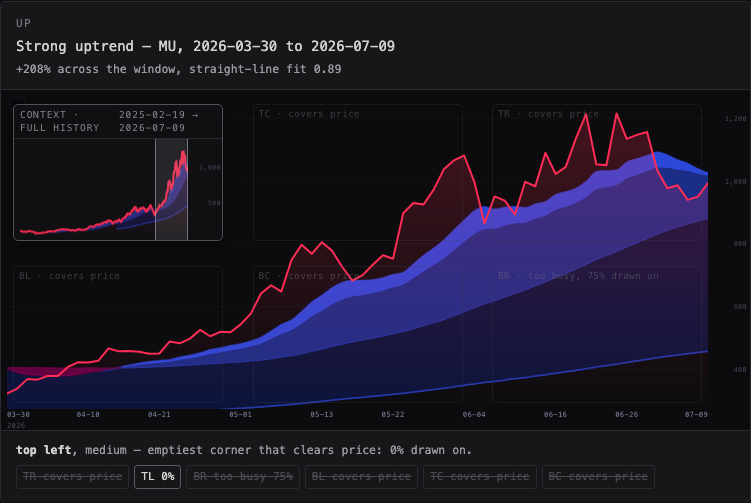
The big chart is the window you are standing in. The lens answers the other question — either where this window sits in the whole history (context view) or what the last few sessions look like close up (detail view). It never covers the price line. It goes in the emptiest corner that is left.
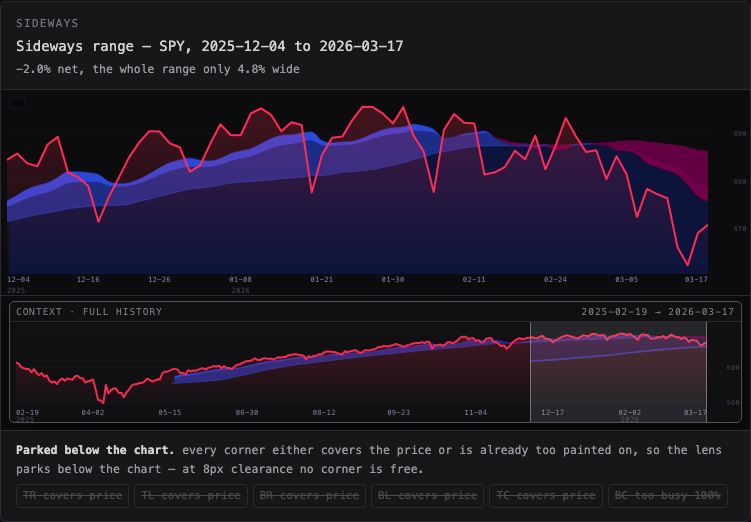
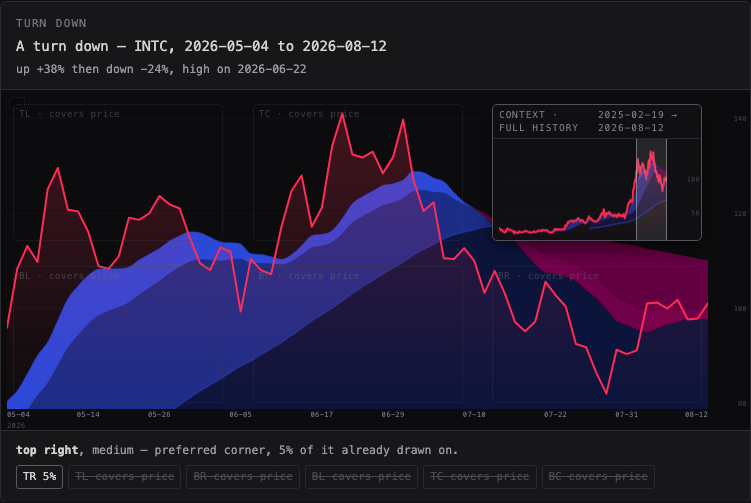
Six real cases are shown: a strong uptrend, a strong downtrend, a sideways range, a turn up, a turn down, and a gap. Each one is a real symbol over a real period, named on the card. On each chart the chosen spot is drawn solid and the corners it did not choose are drawn faded, each with the share of it that is already painted on, so you can see why one corner won.
Adjustment — every number here is a baseline you can move
The rule, in plain words
- Never cover the price. A corner is only allowed if the price line — every visible bar and the line drawn between them — stays at least the clearance you set away from the box. Default 8 pixels.
- Then take the emptiest corner. Of the corners that are allowed, the lens takes the one with the least already painted on it. "Painted" means anything the chart drew there: the price fill, the cloud ribbon, the average names, the axis numbers.
- A corner that is already painted over is refused too. Clearing the price line is not enough: if more than the share you set is already drawn on — cloud ribbon, price shading, average names — the lens will not sit there, because a lens on top of the ribbon is as hard to read as one on top of price.
- A near tie goes to your preferred corner. If your preferred corner is within two percentage points of the emptiest one, it wins, so the lens does not hop about between charts that look alike.
- If it does not fit, it shrinks. Large, then medium, then small.
- If it still does not fit, it parks below the chart rather than sitting on top of the price.
This is the v4 rule carried forward (safety before position, 8-pixel margin, shrink, then the shelf) with one change: v4 chose the allowed corner nearest your preference, which on a busy chart can pick a corner full of cloud ribbon. Here the chart is measured, so "emptiest" is a number rather than a guess.
What this was built from — and v4 is not missing
The brief said a v4 of the lens had existed and was lost. It is on this Mac. I found three versions before building anything:
| What | Where | State |
|---|---|---|
| v4 — "Context Lens — Bubble-Only Review v4" | _worktrees/context-lens-20260919/prototypes/context-lens/index.html |
73,151 bytes, sha256 3f4fc79c…, 19 Sep. Committed on the unmerged branch
candidate/context-lens-20260919, which is why it looks lost: it was never released. |
| v2 — "Context Lens — Review Workshop v2" | ~/Downloads/SCINTILLA_Context_Lens_Interactive_Review.html |
66,382 bytes, 11 Sep. The catalogued one. |
| Today's workshop (lane M5) | deliverables/20260923/context-lens/CONTEXT-LENS.html |
28,280 bytes. This is the one that mixed in the replay, the Geiger and the Visual Engine. |
Carried forward from v4: safety before position, the 8-pixel margin, context and detail as the two bubble states, shrink before shelf, minimal furniture in the bubble, and the rule that the main chart never changes when the bubble does.
Changed, on purpose: v4 drew synthetic fixtures on its own renderer — these are real prices on the Station's renderer. v4 chose the allowed corner nearest your preference; here the chart is measured and the emptiest allowed corner wins, with preference only breaking a near tie. v4's fixed 280–440 pixel boxes are replaced by shares of the pane, because a Station chart is a wide short band, not v4's tall stage. No replay was ever part of the lens — nothing in v4 or v2 has one, and none is here.
What happens on a phone
At 1680 pixels wide, five of the six cases keep the lens inside the chart and the sideways case parks it below. At 390 pixels — a phone — four keep it inside (one of them shrunk to small) and two park below: the sideways range and the turn down. That is the rule protecting price on a small pane, and it is the main thing to decide: on a phone, is a lens below the chart better than no lens, or should the phone simply not show one?
Recommended settings
| Knob | Recommended | Why |
|---|---|---|
| Size | Medium — 30% of the chart's width, 44% of its height | Big enough to read two price levels and two dates; small enough that a corner is usually free. Large needs a quiet chart; small is hard to read on a phone. |
| Corner preference | Top right | Prices more often rise into the top right than sit there, and the live price marker is already on the right edge, so a tie broken to the top right keeps the eye in one place. The rule still moves it when that corner is busy — the uptrend case below is exactly that. |
| Clear of price | 8 pixels | Under about 4 the lens visually touches the line; over about 16 the lens is pushed onto the shelf on ordinary charts. 8 is the v4 value and it holds up on all six cases. |
| Busiest corner allowed | 55% drawn on | Above about 60% the lens sits on solid cloud ribbon and neither reads. Below about 40% almost every corner is refused on a busy chart and the lens ends up on the shelf. 55% keeps a corner on five of the six cases here at desktop width, four of six on a phone. |
| Lens shows | Context | The main chart already shows the recent window in detail. The question the lens is there to answer is "where am I in the whole history". |
| Detail sessions | 24 | About five weeks of daily bars — enough to see the shape of the last move at this size. |
| Opacity | 0.96 | Slightly short of solid: the chart underneath stays faintly visible, so the lens reads as part of the chart rather than a sticker on it. |
| Other corners | Shown here, off in Station | The faded boxes are a workshop aid for this decision. In the Station they would be noise. They are left off when the lens parks below the chart, because the chart is resized at that moment and boxes measured before the resize would be drawn in the wrong place. |
Where each number comes from
- The prices. The chart API,
/candles?symbol=…&tf=D&authority=provider&limit=400— daily, split-adjusted, provider-built bars. Each case card names the symbol, the period and what the window does. The exact response for each symbol is saved next to this page incases/, with the URL and the time it was fetched, so the page draws the same picture every time it is opened. - The chart. The Station's own
chart/index.htmlis loaded in each frame and asked to draw the pane. The line, the axis, the colours, the caption and the cloud ribbon are its code, not a copy of it. Nothing on this page redraws a Station chart in its own way. - The clouds. The Station's
_indicators/station-clouds.js, from the same daily closes: 13 and 21 day exponential averages, 50 and 200 day simple ones. Every window starts at least 200 sessions into the fetched history, so all four averages exist on every case. - The emptiness score. Read from the chart's own canvas after it has drawn: the share of pixels in a corner that carry any ink above a faint-wash threshold. It is a measurement of the picture, not a guess about it.
- The placement.
lens-placement.mjsnext to this page. The tests intests/context-lens-placement.test.mjsimport that same file.
What could be wrong
- The saved prices are a snapshot taken on 23 September 2026. They do not update. A live Station chart would move on; the placement rule would not change, but the chosen corner might.
- Emptiness is measured on the pixels as drawn at the size you are viewing. Resize the window and a corner can change — that is the rule working, but it means there is no single "right" answer to memorise.
- The faint wash under the price line counts as empty below a threshold. A different threshold would move a borderline corner.
- Six cases are six cases. They were picked by scoring 70-session windows across 18 symbols, but a shape this page does not contain — a long quiet chart with one spike, say — has not been tried.
- The lens here is a still picture of a placement decision. How it feels while you pan and zoom a live Station chart is not tested by this page.
What I did not do
- No replay, no Geiger in motion, no Visual Engine — none of that belongs to the lens.
- I did not change the Station chart, the clouds, or any other Station page. This page only reads them.
- I did not deploy or push. Nothing here is live until the coordinator merges it.
- I did not wire the lens into the Station chart itself. This is the decision workshop that comes first.
Screenshots
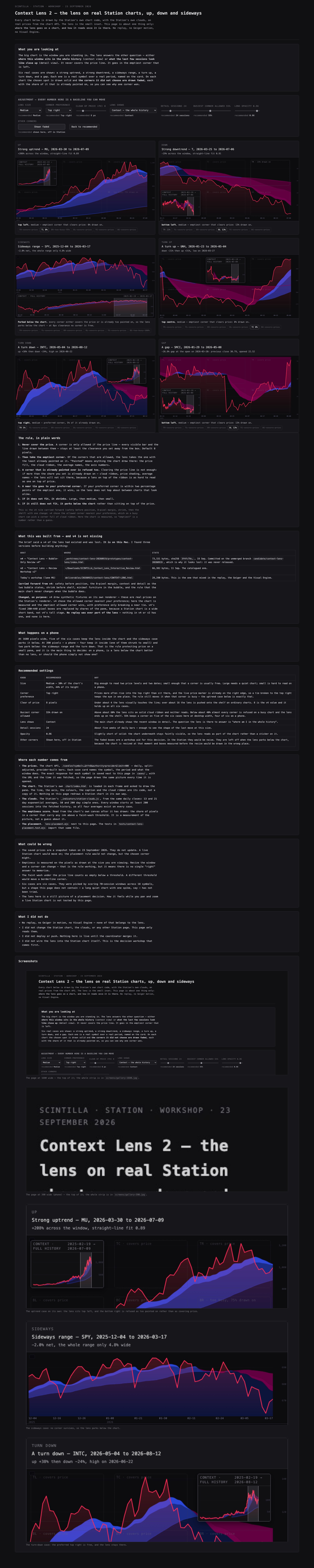
screens/gallery-1680.jpg.
screens/gallery-390.jpg.